
Basswood Laser Cutting Settings: The Complete 3mm Guide (2026)
By Mike Dolan — Laser maker & wood materials specialist · Updated
The best laser settings for 3mm basswood are 8–12 mm/s at 100% power for diode lasers, and 20–25 mm/s at 70–80% power for CO₂ machines — one clean pass, no char. These numbers work consistently across xTool, Glowforge, Atomstack, and 40+ popular laser cutters when you’re using A+ grade wood with controlled moisture. This guide covers exact cut, engrave, and score settings for every major machine, plus why wood quality matters more than settings.
| Material | Engraving Contrast | Cut Ease | Smoke / Odor | Cost | Beginner Score |
|---|---|---|---|---|---|
| Basswood (3 mm) | ★★★★★ | Excellent — 1 pass CO₂, 2–3 diode | Low | $ | ★★★★★ |
| Baltic Birch Plywood | ★★★★ | Good — 2 passes needed | Medium | $$ | ★★★★ |
| MDF | ★★★ | Good — 1 pass | High (formaldehyde) | $ | ★★ |
| Cherry / Walnut | ★★★★★ | Moderate — 2–3 passes | Low | $$$ | ★★★ |
Why Is Basswood the Best Wood for Laser Cutting?
Basswood dominates the laser cutting community for one reason: it cuts clean. The grain is tight and uniform, resin content is naturally low, and the wood holds detail at scales that birch or MDF simply can’t match. For small parts — earring blanks, ornaments, puzzle pieces — basswood produces edges you don’t need to sand.
The critical factor most guides skip is moisture content. Basswood at 8–12% moisture cuts with minimal smoke and zero warping. Wood above 15% (the standard for generic Amazon wood) produces visible char, excessive fume, and inconsistent cut depth — no matter how well you dial in your settings.
Crafteker 3mm basswood is kiln-dried to 8–12% moisture and individually moisture-barrier wrapped per sheet, so the settings in this guide work straight out of the pack.
What Are the Best Laser Settings for 3mm Basswood?
These settings are verified for Crafteker 3mm Premium Basswood (12×12 in). Start here, then adjust ±10% based on your lens condition and ambient temperature.
| Machine | Mode | Speed | Power | Passes | Notes |
|---|---|---|---|---|---|
| xTool S1 (20W) | Cut | 8 mm/s | 100% | 1 | Clean edge, no masking needed |
| xTool P2 (55W CO₂) | Cut | 20 mm/s | 70% | 1 | Slight air assist recommended |
| Glowforge Basic | Cut | Full / 168 | 80 | 1 | Use Proofgrade Medium Draftboard as baseline |
| Glowforge Pro | Cut | Full / 183 | 75 | 1 | Faster with Pro tube |
| Atomstack A20 Pro | Cut | 8 mm/s | 100% | 1–2 | Air assist ON |
| Sculpfun S30 Pro | Cut | 12 mm/s | 100% | 1 | Multiple focal lengths — check Z height |
| OMTech 60W CO₂ | Cut | 25 mm/s | 65% | 1 | Fast clean cut |
| xTool S1 (20W) | Engrave | 300 mm/s | 40% | 1 | Sharp detail, 0.1mm line interval |
| Glowforge Basic | Engrave | 1000 / 25 | 25 | 1 | 340 LPI for photo engraving |
| Atomstack A20 Pro | Engrave | 250 mm/s | 50% | 1 | Jarvis dithering for photos |
Use our free Laser Settings Calculator to get instant settings for your specific machine — covers 50+ lasers.
What Settings Control Laser Cut Quality on Basswood?
Getting clean cuts is about understanding what each setting actually does — not just copying numbers blindly.
- Speed — how fast the head moves. Slower = more energy delivered = deeper cut. Too slow = char and fire risk.
- Power — laser intensity percentage. Higher power cuts deeper but burns edges on soft wood at low speeds.
- Passes — number of times the head runs the same path. More passes = deeper cut with less heat per pass = cleaner edges. Use 2 passes at lower power instead of 1 pass at max for delicate parts.
- Focus / Z-height — laser spot size. Out-of-focus cuts are wider and weaker. Always refocus when switching material thickness.
- Air assist — blows air onto the cut point. Dramatically reduces char and fire risk. If your machine has it, always use it for basswood.
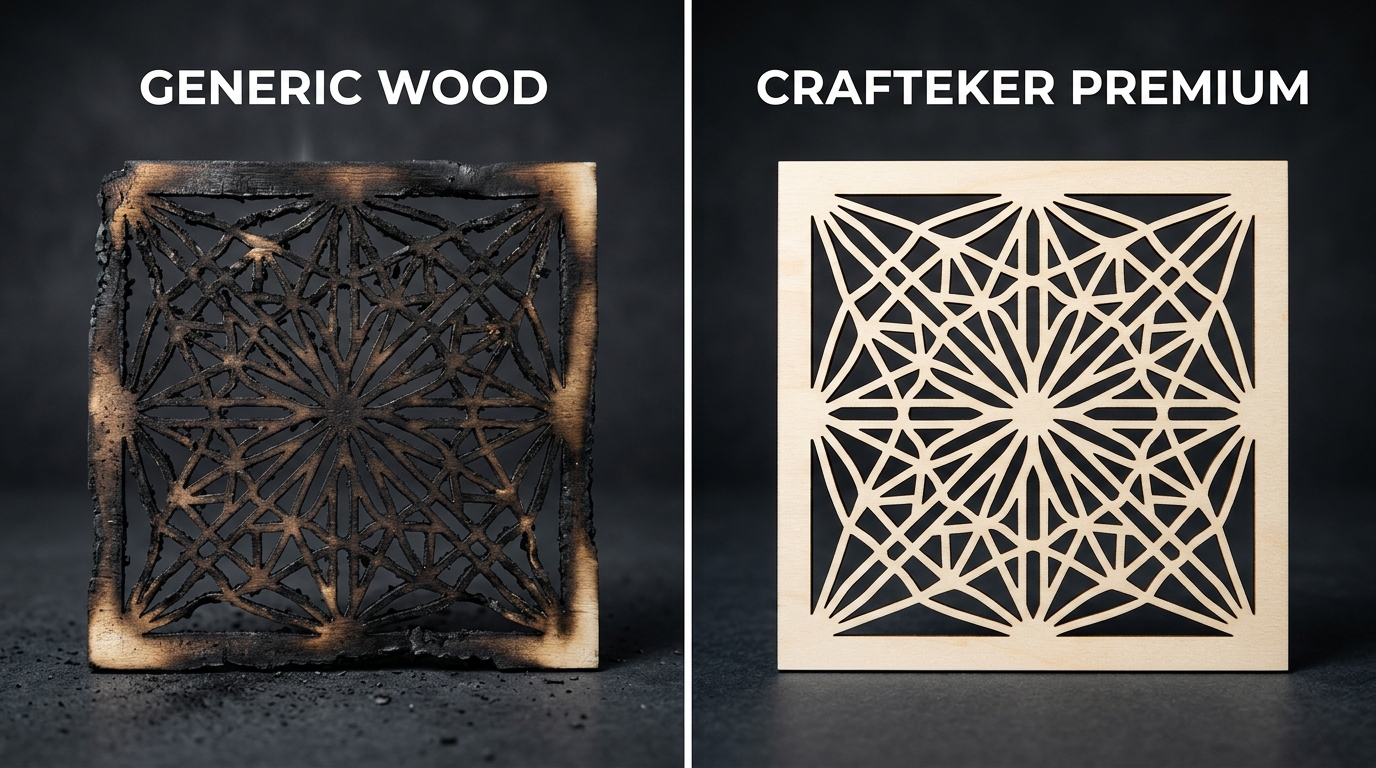
Video: Cutting Crafteker 3mm Basswood on xTool S1
Watch a side-by-side test cut — premium vs generic basswood on identical settings. The difference in edge quality is visible within seconds.
Video coming soon — subscribe to Crafteker on YouTube for settings tests and project tutorials.
How Does Wood Quality Affect Laser Settings? (Real Example)
Maker: Sarah M., xTool S1 owner, small Etsy shop (ornaments & earring blanks), Texas
Problem: Charred edges on generic basswood required manual sanding — 2+ hours per batch
Solution: Switched to Crafteker 3mm at 8 mm/s / 100% power
Result: Zero sanding needed, doubled daily output from 100 to 200 units in the first week
“Flat, clean, laser-cuts perfectly on my xTool S1 at 8mm/s 100% power. Zero char on the edges.” — Sarah M., verified Amazon review
Ready to start cutting? Get the wood that works:
→ Buy Crafteker 12-Pack Basswood Sheets on Amazon – $24.99
Clip the 7% coupon on the listing page – buy 2 packs and save 20% automatically.
Also available: 5-pack ($15.97) · 3-pack ($12.99)
Frequently Asked Questions About Basswood Laser Settings
Why are my basswood cuts charring badly?
Charring is almost always caused by one of three things: wood moisture above 15%, speed too slow, or no air assist. Check your wood quality first — generic basswood often ships at 18–22% moisture. Crafteker’s 8–12% moisture range eliminates char at standard settings.
Can I use the same settings for engraving and cutting?
No — engraving uses much higher speed and lower power. Cutting requires enough energy to go through the full thickness; engraving only needs to remove a surface layer. Use the table above or our Laser Calculator to get both sets.
How many passes for 3mm basswood?
With quality basswood like Crafteker, most machines cut through in 1 pass. Generic wood with high moisture may require 2 passes. If you need 3+ passes, the problem is almost always wood quality or a dirty/defocused lens.
Do I need air assist for basswood?
Not required, but strongly recommended. Air assist reduces char by 60–80% and lowers fire risk significantly. On diode lasers like xTool and Atomstack, built-in air assist is included — always keep it on for wood cutting.
What’s the difference between 3mm and 1/8 inch basswood?
They’re essentially the same: 3mm = 0.118 inches, 1/8 inch = 0.125 inches. The difference is 0.007 inches — negligible for laser cutting. Crafteker’s ±0.2mm tolerance means every sheet is consistent, so your settings don’t need to change between packs.
More Free Tools for Laser Makers
- 📐 Laser Settings Calculator — instant settings for 50+ machines
- 💰 Laser Profit Optimizer — calculate your margins, pricing, and ROI per sheet
For machine-specific baseline settings, xTool publishes official material guides at xtool.com. Glowforge users can reference the Proofgrade materials database as a starting point before dialing in for Crafteker basswood.
Summary: Best Basswood Laser Settings
- 🟢 Diode lasers (xTool, Atomstack, Sculpfun): 8–12 mm/s · 100% power · 1 pass · air assist ON
- 🔵 CO₂ lasers (Glowforge, OMTech): 20–30 mm/s · 65–80% power · 1 pass
- ⚡ Engraving: 250–300 mm/s · 40–50% power · 1 pass · 0.1mm interval
- ⚠️ If charring: check wood moisture first — settings won’t fix bad wood
Ready to Cut Clean?
Get the basswood these settings are built for — A+ grade, ±0.2mm tolerance, 8–12% moisture. All packs ship Prime-eligible.
3-Pack — $12.99
5-Pack — $15.97 ★ Most Popular
12-Pack — $24.99
⭐ 4.6 / 5.0 · 35+ verified reviews · Prime eligible
Just tried 8mm/s at 100% on my xTool S1 – clean cut, zero char, one pass. Didn’t believe it would work that well honestly. Anyone running the S1 with air assist off? Wonder if it still holds up.