

4 Reasons Basswood Plywood Engraves Differently (2026)
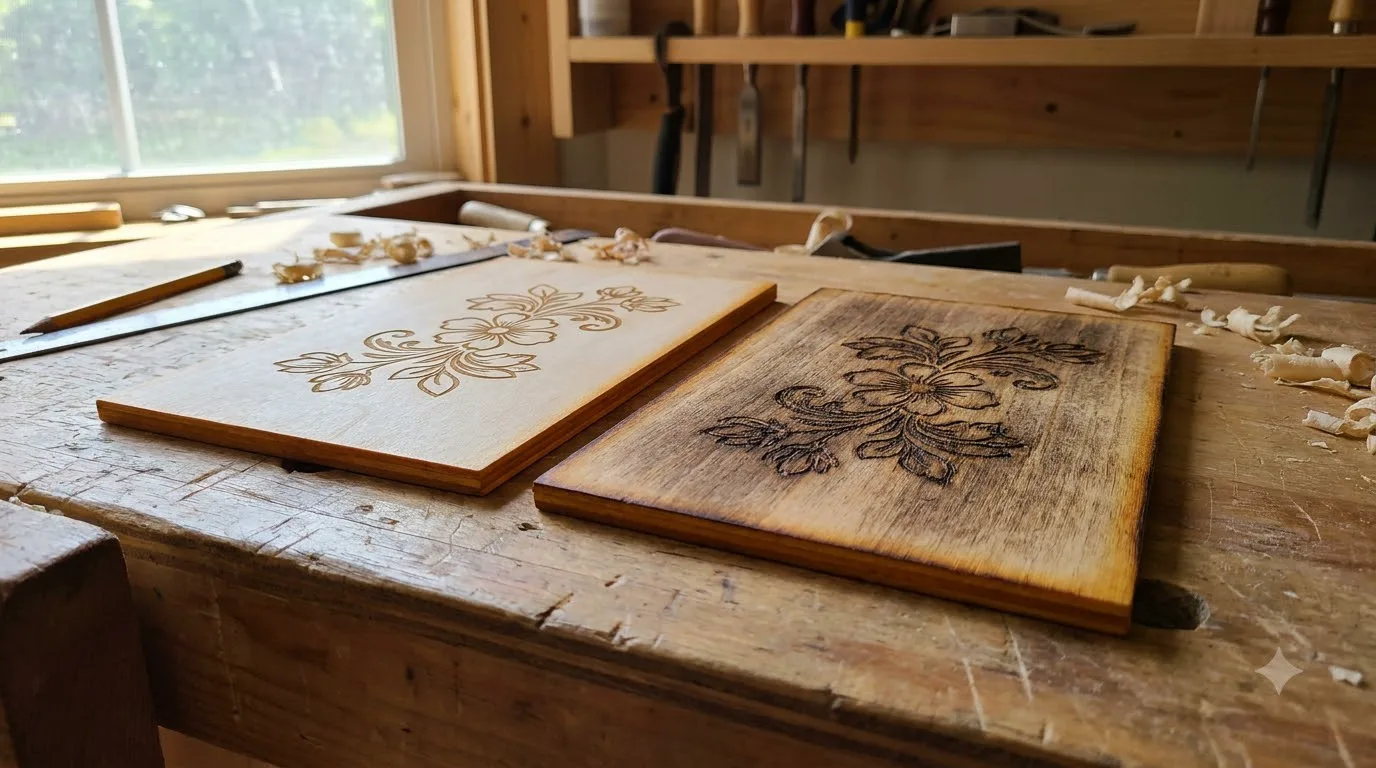
The front face of basswood plywood is the higher-graded, finer-sanded veneer, and that’s the real reason it engraves lighter and more evenly than the rougher back face at identical settings. This guide breaks down the 4 reasons front and back faces engrave differently, how to spot the good face before you cut, and how to dial in matching results on both sides.
By Mike Dolan ·
Quick Answer: Basswood plywood engraves differently on front and back because of face veneer grading, grain, and glue lines – not a machine problem – and forums report needing roughly 5-20% more power on the back face to match the front face’s contrast.
| Material | Engraving Contrast | Cut Ease | Smoke / Odor | Cost | Beginner Score |
|---|---|---|---|---|---|
| Basswood (3 mm) | ★★★★★ | Excellent – 1 pass | Low | $ | ★★★★★ |
| Baltic Birch Plywood | ★★★★ | Good – 2-3 passes | Medium | $$ | ★★★★ |
| MDF | ★★★ | Good – 1-2 passes | High (formaldehyde) | $ | ★★ |
| Pine / Soft Plywood | ★★★ | Poor – resin deposits | Medium-High | $ | ★★ |
Why Do the Two Faces of Basswood Plywood Engrave Differently?
The front face carries a higher veneer grade and a finer mill sanding pass, straight off the production line. The back face usually carries more sapwood, small patches, and jointed veneer pieces stitched together – that grading gap is what drives the contrast you’re seeing, not your laser, your settings, or anything you did wrong.
According to USDA Forest Products Laboratory data, basswood ranks among the lowest-resin domestic hardwoods, with unusually even density running through the log. That same pale, uniform color is exactly why front-to-back contrast shows up so clearly on basswood.
A darker, busier-grained species would hide the same grading difference without much trouble. If you’re just getting into laser engraving wood blanks, this is one of the first surprises you’ll run into – and it catches almost everyone once.
I learned this the hard way. I engraved a whole batch on the back face by mistake, and it came out visibly darker and blotchier than the test piece I’d run on the front face that same morning. Once I flipped the sheet over and looked closely, the texture difference was obvious.
Picking best basswood sheets for laser cutting won’t erase this contrast – it’s baked into how plywood mills grade veneer, not a sourcing problem. What it does guarantee is that both faces start from clean, void-free material instead of a bad core hiding underneath a nice-looking surface. It’s a good reminder that grading differences and core quality are two separate things entirely.
None of that changes what basswood is made of, though – it’s still the same low-resin, even-grained wood on both sides:
- Low resin – keeps engrave results from turning gummy or sappy, regardless of which face you’re working on
- Consistent density – predictable contrast from batch to batch, whichever face you settle on for a project
- Workable surface on both faces – both sides are void-free, structurally sound plywood; the difference is cosmetic contrast, not build quality
- No toxic fumes – safe to run test engraves on both faces indoors while you dial in settings for each
4 Reasons Front and Back Faces Engrave Differently
Front and back faces engrave differently because they’re not the same wood surface, even though they came off the same sheet. Four things stack up to create that contrast.
- Face grading. The front, or “good,” face gets graded higher and sanded finer at the mill. The back face is where mills use up more sapwood, small patches, and jointed veneer pieces – it’s still solid wood, just less fussed-over.
- Grain and density variation. Denser latewood bands absorb and dissipate laser heat differently than the softer earlywood next to them. On a rougher face, that grain pattern shows through more, so contrast tends to follow the grain lines instead of staying even.
- Glue lines. The core veneers are cross-banded and glued together, and those glue lines run denser than the wood fiber around them. At the same power and speed, a glue line can come out slightly lighter or shallower than the wood beside it.
- Surface finish. The front face gets a finer sanding pass than the back. A rougher surface scatters the beam and holds soot unevenly, which is why the back face often looks blotchier at identical settings.
I didn’t fully believe how much this mattered until I ran a test engrave on both faces of the same scrap piece, side by side. Same file, same settings, same pass. The front came out even and light brown. The back came out darker in patches, with the grain lines standing out like they’d been highlighted. Nothing about my machine changed between the two – the wood did.
How to Tell the Front Face from the Back Face Before You Cut
You can tell the faces apart by eye before you ever fire the laser. The front face looks smoother and more uniform, with a tighter grain pattern and few, if any, visible patches or seams. The back face is where the small stuff hides – inset patches, faint joint lines, and a slightly rougher texture you’ll feel more than see under normal light.
On laser-grade sheets like Crafteker’s, both faces are void-free and fully usable – this isn’t a defect, it’s cosmetic contrast built into how plywood veneer gets graded. That said, picking the smoother face every time for whatever side faces the customer keeps a whole batch looking consistent, instead of some pieces reading lighter and others darker for no obvious reason.
I learned this the annoying way. Early on I mixed up which side was which on a batch of blanks and didn’t catch it until half were engraved. Now I run a thumb across the sheet before I load it – the smoother side wins, every time, no exceptions.

How to Get Consistent Engraving on Both Faces
The most reliable fix is also the most skipped step: run a test engrave on scrap from both faces before starting a production run – not just one face. It takes a few minutes and saves you from burning through a full batch at the wrong setting.
Forum and shop-experience reports – this is not Crafteker lab-tested data – suggest makers commonly need roughly 5-20% more power, or a modest speed reduction, on the back face to match the front face’s contrast at identical settings. Treat that range as a starting point, not a guaranteed number. Your machine, your wood, your result.
Once you’ve dialed in both faces, pick one and stick with it for the entire batch. Mixing faces mid-run is how you end up with inconsistent output – ask me how I know.
I ran a test engrave on both faces of the same scrap piece, bumped power up slightly for the back face, and landed a result that matched the front face closely enough to run a full order confidently. That’s the whole process.
One more note: lightly sanding the rougher back face can even out the surface and improve results. But sanding changes how the beam interacts with the surface, so any previously dialed-in setting will shift. Always retest after sanding – don’t assume your old numbers still hold. If scorched edges are showing up on either face after you adjust,preventing charring when laser cutting breaks down the most common causes and fixes.
Is Face-vs-Back Engrave Difference a Defect?
No – it’s a normal, expected characteristic of how plywood is graded and manufactured, full stop. Front-to-back contrast exists because face veneers are intentionally graded differently at the mill, with the better face sanded finer and selected for fewer patches and joints. That grading system predates laser cutters by decades.
Even laser-grade, void-free sheets like Crafteker’s basswood will show some front-vs-back contrast, because it’s inherent to how face veneers are graded across the entire plywood industry – not something specific to one supplier or product line. Void-free construction removes hidden gaps and bad cores from the equation, but it doesn’t flatten out the grading difference between the two faces. That difference is in the wood.
The fix is testing and settings, not returning the material. If your front and back faces engrave differently at the same settings, that’s not a product defect – that’s just wood being wood. Dial in your test piece, note what works for each face, and move on.
Where to Buy Consistent, Void-Free Basswood Plywood
Crafteker’s 3mm laser-grade basswood sheets are void-free, which means the core construction is one less variable to troubleshoot. Face-vs-back contrast is a normal wood-grading characteristic you’ll work through on any plywood – but void-free construction means you’re not also fighting hidden gaps or soft cores making the contrast worse on top of that.
Available on Amazon in three sizes: 3-pack at $12.99, 5-pack at $15.97, and 12-pack at $24.99 ($2.08/sheet – the best value for batch work). Clip the 7% coupon on the listing page before you check out. It’s right there; don’t skip it.
Ready to cut? Get the wood that works with these settings:
→ Buy Crafteker 12-Pack Basswood Sheets on Amazon – $24.99
Clip the 7% coupon on the listing page before you check out.
Also available: 5-pack ($15.97) · 3-pack ($12.99)
Frequently Asked Questions
Why does my laser engraving look different on the front and back of the wood?
Because plywood face veneers are graded differently at the mill. The front face is higher grade and sanded finer, while the back face can carry more sapwood, patches, and jointed veneer pieces. Add in grain and glue-line variation, and you get contrast that has nothing to do with your machine.
Which face of basswood plywood should I engrave?
Pick the smoother, more uniform “good” face for anything customer-facing – it’s graded higher and sanded finer at the mill. Still, test both faces on scrap first. I’ve had sheets where the difference was obvious and others where you’d need a magnifier to tell.
Do I need different laser settings for the back face of plywood?
Often, yes. Makers commonly report on forums needing roughly 5-20% more power, or a slightly slower pass, on the back face to match the front face’s contrast. Treat that as a starting range, not a rule, and confirm it on your own test piece before a full run.
Is uneven front-to-back engraving a sign of bad quality plywood?
No, it’s a normal side effect of how plywood face veneers are graded across the whole industry, not a defect. Even laser-grade, void-free sheets show some contrast between faces. The fix is a test engrave and a settings tweak, not a return label.
Where can I buy consistent, void-free basswood plywood?
Crafteker sells 3mm void-free basswood on Amazon in a 3-pack ($12.99), 5-pack ($15.97), and 12-pack ($24.99, $2.08/sheet – the best value if you’re running batches). Clip the 7% coupon on the listing page before you check out.
About the author: Mike Dolan is a laser maker and wood materials specialist with 8+ years cutting basswood, birch, and MDF on diode and CO₂ machines. He tests every Crafteker basswood batch before listing.
I never noticed my front and back faces looked different until I flipped a sign blank mid-batch and the back side came out noticeably darker and blotchy. Ran a quick test on scrap, bumped power up a bit for the back face, and now both sides of my Crafteker basswood match close enough that customers never notice.