

Recut, Knife, or Scrap? 3 Ways to Fix a Cut (2026)
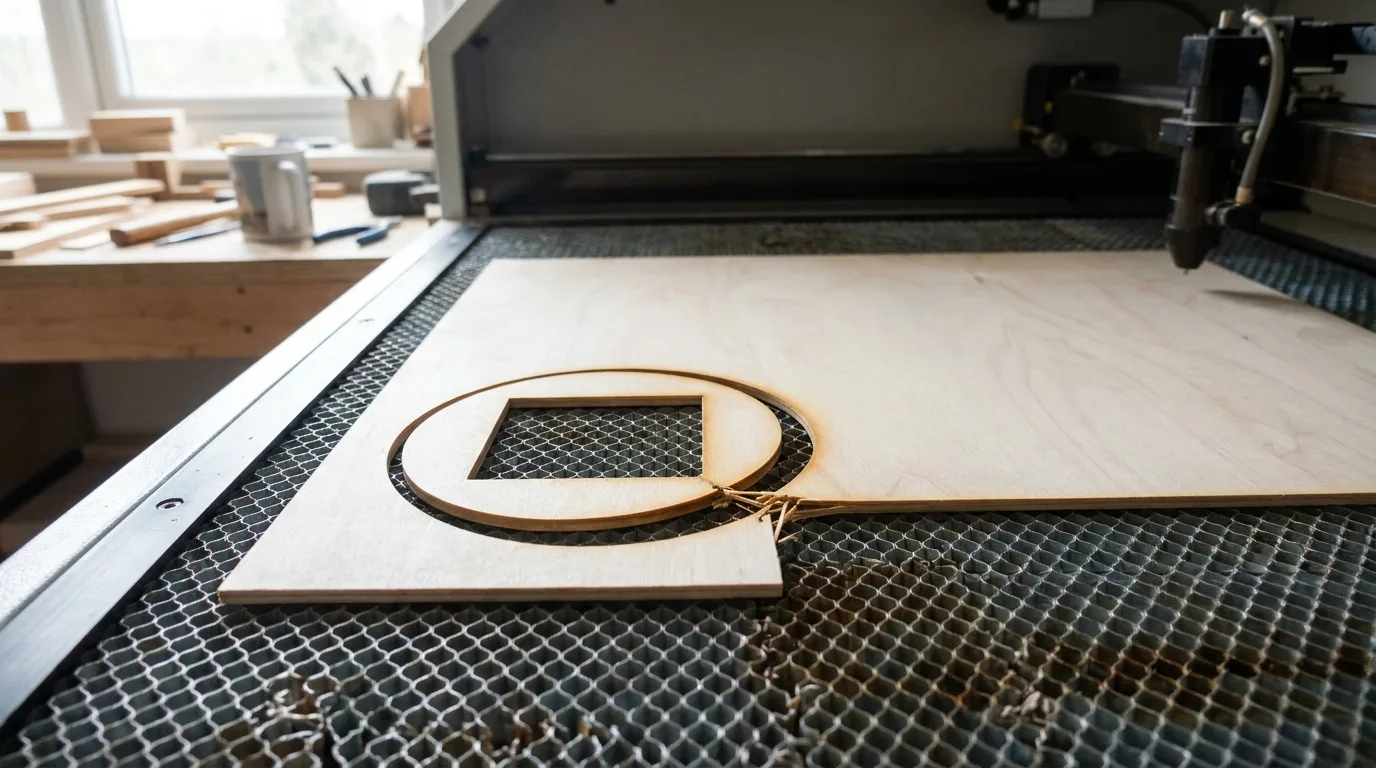
Most partial cuts on 3mm basswood are fixable, if the piece hasn’t moved off the bed, a follow-up pass at the same settings (a 10W diode baseline runs 5mm/s, 100% power, 2-3 passes) usually finishes the job. This guide walks through exactly when to re-run the cut, when to grab a craft knife instead, and when to just scrap the piece and start over.
By Mike Dolan ·
Quick Answer: Recut, knife, or scrap: recut if the piece hasn’t moved (10W diode baseline: 5mm/s, 100% power, 2-3 passes); knife short webs under 10-20mm; scrap deep char or warped pieces.
| Material | Engraving Contrast | Cut Ease | Smoke / Odor | Cost | Beginner Score |
|---|---|---|---|---|---|
| Basswood (3 mm) | ★★★★★ | Excellent – 1 pass | Low | $ | ★★★★★ |
| Baltic Birch Plywood | ★★★★ | Good – 2-3 passes | Medium | $$ | ★★★★ |
| MDF | ★★★ | Good – 1-2 passes | High (formaldehyde) | $ | ★★ |
| Pine / Soft Plywood | ★★★ | Poor – resin deposits | Medium-High | $ | ★★ |
Why Did My Laser Cut Only Partway Through the Wood?
Almost always it’s focus drift, a dirty lens, or a locally inconsistent spot in the sheet, not one universal settings mistake. Light brown edges are normal. A cut that stops short of the bed is your machine telling you something changed mid-job.
Basswood itself is about as predictable as wood gets. According to USDA Forest Products Laboratory data, basswood ranks among the lowest-density, most consistent domestic hardwoods, which is exactly why it’s a forgiving material to dial in basswood laser cutting settings for. But even a consistent species can hide a locally weak or warped spot, a glue pocket in cheaper plywood, a slightly cupped corner, and a focus-sensitive laser will expose that spot every time.
I’ve pulled a piece off the bed assuming it was done, only to find a corner still held on by an uncut web. Ten seconds of squinting would’ve caught it before I yanked and splintered the edge. Worth checking your lens too: a dirty lens can reportedly block 40-60% of power before it looks obviously dirty, a range I’ve seen repeated across enough maker forums to trust as a general rule, not something we’ve bench-tested here at Crafteker.
- Low resin – doesn’t add gummy residue that compounds a marginal cut into a failed one
- Consistent density – fewer surprise weak spots than cheaper plywood, though not a guarantee against a locally warped area
- Minimal char – makes it easier to spot a shallow cut before you pull the piece and tear a web
- Workable surface – easier to inspect and sand around a partial-cut area without extra force
- No toxic fumes – safe to run repeated test cuts indoors while you track down the real cause
3 Ways to Fix a Partial Cut: Recut, Knife, or Scrap
You’ve got three real options here: run it again, cut the last bit by hand, or toss it and start fresh. One quick honesty note before the table: the 10W diode figure below (5mm/s, 100% power, 2-3 passes) is a widely shared forum/community reference point, not something Crafteker measured in-house – treat it as a rough baseline, not gospel for your machine.
| Option | When | How |
|---|---|---|
| Recut | Piece hasn’t moved, incomplete areas are widespread or long, edges only lightly/moderately browned | Follow-up pass at same power, same or slightly slower speed (10W diode baseline: 5mm/s, 100% power, 2-3 passes) – never by raising power |
| Craft knife | Only short, local uncut webs under roughly 10-20mm, at corners or simple straight edges | Score from both sides on a cutting mat, snap or slice clean |
| Scrap | Edges already heavily/deeply charred, material visibly warped or cracked, or uncut area is long/curved/structural | Cut a fresh piece – neither a recut nor a knife fixes this cleanly |
The one precondition that makes a recut safe: the piece cannot have shifted since the first pass. Even a slight bump, and the second pass misses the original kerf line entirely – a failure forum threads bring up constantly, often from people who swear they never touched the material.
How to Re-Run a Cut Without Wrecking the Piece
The short version: don’t move the sheet, and don’t reach for more power. Leave the workpiece exactly where it landed after the first pass, lid closed if you can manage it, and pull up your software’s preview or selective-recut tool instead of hitting run on the whole file again. Targeting just the incomplete segments keeps extra heat and misalignment risk contained to the spot that actually needs it.
I ran a second pass on just the problem corner using the preview jump-to-segment feature instead of rerunning the whole file, and it lined up clean – no double kerf, no stepped edge, no drama.
When you do run the follow-up pass, keep power where it was and either match your original speed or drop it slightly. Cranking power up feels like the fast fix but every pass adds heat, which widens the kerf and darkens the edge more than it improves penetration. If you’ve had a recut miss alignment before even when the sheet seemed untouched, check for loose belts or mechanical slip before trusting a repeat pass on anything you care about – that’s a machine problem, not a settings problem, and no amount of tweaking the basswood laser cutting settings will fix it.

When to Grab a Craft Knife Instead of Recutting
Grab a knife only when the uncut web is short and local, think corners, small connecting tabs, or bridges inside a cutout. Anything longer than that, or any curve, is a job for the laser, not your hand.
Back the piece on a cutting mat and use light, repeated passes instead of one hard slice. Thin basswood splinters if you push too hard in one go, and a single deep cut is how you end up with a cracked piece instead of a finished one.
I tried hand-cutting a long uncut edge instead of a small tab once, figured a knife was a knife. The result was a visibly wandering, uneven line sitting right next to the clean laser-cut edge on the rest of the piece. Lesson learned: knives are for tabs, not runs.
Signs a Piece Is Too Far Gone to Save
A piece is too far gone when the damage is bigger than the fix. Here’s what tells you to stop trying and start fresh:
- Deep, heavy charring instead of light browning: another pass just adds more burn, not more penetration through the wood.
- Visible warping or cracking in the material itself: that’s a structural problem, not a cut problem, and no amount of re-cutting fixes it.
- A previous recut already left a double kerf or stepped edge: trying again usually makes the mismatch more obvious, not less.
- The uncut area is long, curved, or structural: neither a follow-up pass nor a knife can close that gap without weakening the piece or throwing off the fit.
If you’re chasing this problem often, it’s worth reviewing your basswood laser cutting settings and looking into ways to prevent charring when laser cutting before it costs you another sheet.
Where to Buy Basswood That Cuts Through Clean the First Time
Consistent, void-free 3mm sheets remove one common cause of local partial-cut failures, no glue pockets, no hidden voids, no uneven density hiding inside the sheet. That won’t fix a focus or optics problem, but it’s one less variable fighting you mid-cut.
Crafteker 3mm basswood sheets ship pre-sanded and void-free: 3-pack at $12.99, 5-pack at $15.97, and the 12-pack at $24.99 ($2.08/sheet, the best per-sheet value). All sizes ship FBA on Amazon.
Ready to cut? Get the wood that works with these settings:
→ Buy Crafteker 12-Pack Basswood Sheets on Amazon – $24.99
Also available: 5-pack ($15.97) · 3-pack ($12.99)
Frequently Asked Questions
Why didn’t my laser cut all the way through the basswood?
Usually it’s focus drift, a dirty lens, or a locally inconsistent spot in the sheet like a glue pocket or slight warp, not a settings mistake across the whole file. A dirty lens alone can reportedly block 40-60% of power before it looks obviously dirty (community-reported, not a Crafteker lab figure), which is often enough to leave the cut shallow.
Is it safe to re-run a laser cut on the same piece?
Yes, as long as the piece hasn’t moved since the first pass. Run the follow-up pass at the same power and the same or slightly slower speed (a 10W diode baseline is 5mm/s, 100% power, 2-3 passes), and use your software’s preview to target only the incomplete segments instead of the whole file.
Can I finish an incomplete laser cut with a craft knife?
Yes, but only for short, local uncut webs at corners or simple straight edges, roughly under 10-20mm. Long, curved, or structural uncut runs are hard to hand-finish cleanly and tend to leave a wandering edge next to your clean laser-cut lines.
How do I know if a partially cut piece is too far gone to save?
Deep charring beyond light browning, visible warping or cracking, a previous recut that left a double kerf or stepped edge, or a long, curved, or structural uncut area are all signs to scrap it and start fresh rather than chase it with another pass.
Where can I buy basswood sheets that cut through cleanly?
Crafteker sells void-free 3mm basswood on Amazon: 3-pack $12.99, 5-pack $15.97, and 12-pack $24.99 ($2.08/sheet, best value), ships FBA. Consistent density removes one common cause of local partial-cut failures, though it won’t fix a focus or optics problem on your end.
About the author: Mike Dolan is a laser maker and wood materials specialist with 8+ years cutting basswood, birch, and MDF on diode and CO₂ machines. He tests every Crafteker basswood batch before listing.
Saved a frame piece last week by jumping straight to the problem corner in LightBurn’s preview instead of rerunning the whole file, lined up perfect on the second pass. Had another sheet with a warped corner that kept coming out half-charred no matter what I did, just scrapped it and cut a fresh one from a flat sheet.