

Clean, Flip, or Scrap? Basswood Smoke Buildup Guide (2026)
Smoke and resin buildup on your laser bed doesn’t stay on the bed – it transfers straight onto the underside of every new basswood sheet you run over it, and that residue gets worse with each repeated cut in the same spot. This guide walks through the actual decision framework: when to clean the bed, when a quick wipe on the sheet is enough, when flipping buys you a few more cuts, and when the sheet just needs to go in the scrap pile.
By Mike Dolan ·
Quick Answer: Managing smoke, soot, and resin buildup on basswood mid-production means knowing one thing: bed residue transfers onto sheet backs, so you clean the bed for widespread buildup, wipe or flip for isolated stains, and scrap sheets with permanent damage.
| Material | Engraving Contrast | Cut Ease | Smoke / Odor | Cost | Beginner Score |
|---|---|---|---|---|---|
| Basswood (3 mm) | ★★★★★ | Excellent – 1 pass | Low | $ | ★★★★★ |
| Baltic Birch Plywood | ★★★★ | Good – 2-3 passes | Medium | $$ | ★★★★ |
| MDF | ★★★ | Good – 1-2 passes | High (formaldehyde) | $ | ★★ |
| Pine / Soft Plywood | ★★★ | Poor – resin deposits | Medium-High | $ | ★★ |
How Soot on Your Honeycomb Bed Gets Onto Your Sheet
Your bed picks up the residue first, then hands it off to the next sheet you run over that spot. Every cut leaves behind soot, resin, and char on the honeycomb insert and spoil board underneath. Run another sheet over that same patch and the underside picks up whatever’s sitting there, especially in corners or lanes you keep reusing for batch work.
That transferred grime doesn’t stay put either. It works its way into the kerf and along the cut edges, so instead of a clean burn line you get darker, patchier char and engraves that look muddier than they should. The dirtier the bed, the worse your edge quality gets, even with settings dialed in.
Basswood’s low resin content means it puts less gunk back into your bed than resinous woods like pine, and USDA Forest Products Laboratory data backs that up. But that’s not the same as immunity. A bed left dirty from plywood, MDF, or a previous resin-heavy project will stain the basswood sheets that come after it just as easily.
I learned this running a batch of ornaments in the same corner of my bed. First batch, backs came out clean. By the third batch, every sheet had a hazy brown film on the underside that wasn’t there before, and I hadn’t touched a single setting. The bed had quietly built up enough residue to start showing on the wood. If you want to avoid chasing that problem after the fact, it helps to know how to prevent charring when laser cutting before buildup starts affecting your edges, and to understand how basswood compares to other lightweight stock in the first place – see basswood vs balsa for laser cutting for that breakdown.
Cleaning the Bed vs Cleaning the Sheet: Two Different Fixes
Cleaning the bed and cleaning a sheet solve two different problems, and mixing them up is exactly how you end up re-staining sheet after sheet. One job fixes the machine. The other only fixes whatever’s already in your hands, and it does nothing for what comes next.
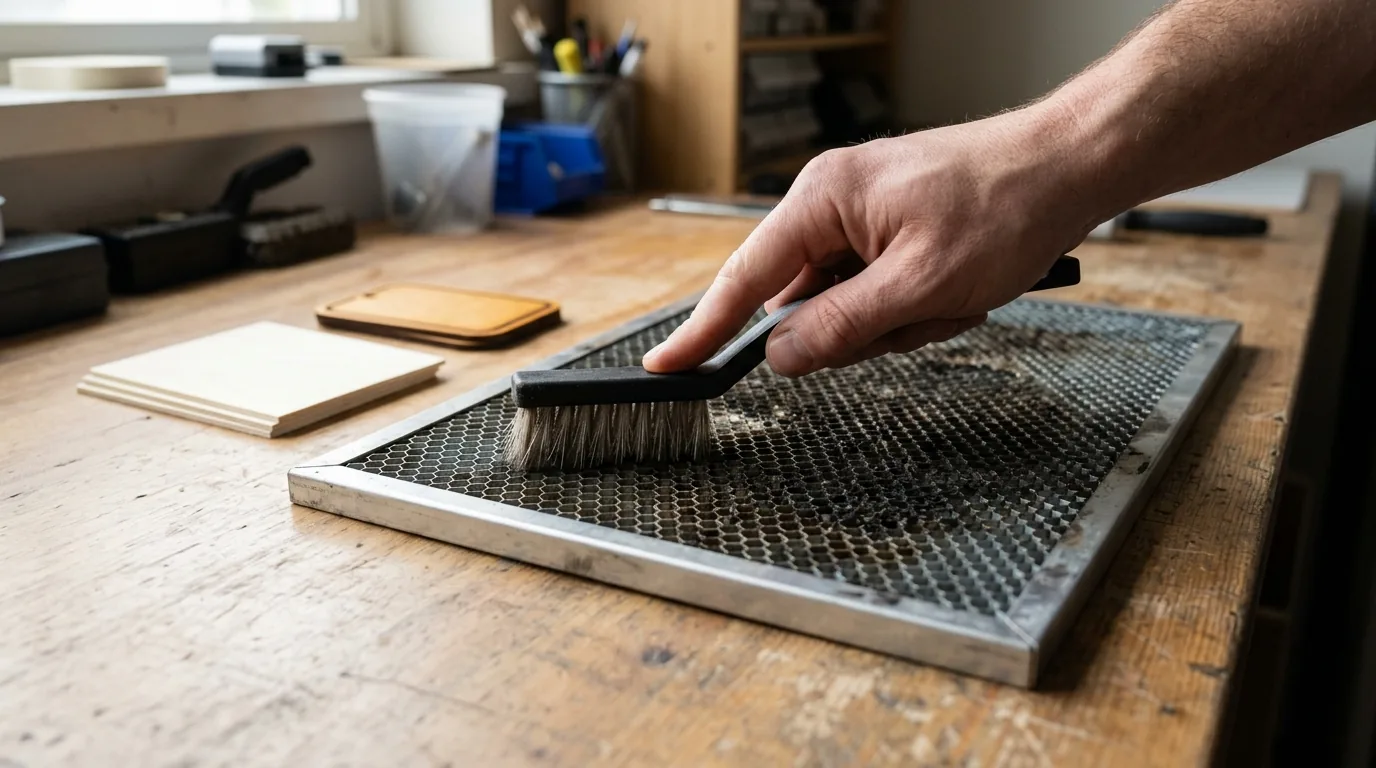
Bed cleaning means pulling the honeycomb insert out entirely. Soak it in a tub of hot water with dish soap or a mild citric-acid or degreaser solution, then scrub the grid by hand to break up baked-on resin and char. Rinse thoroughly with a hose or jetwash, and dry it completely before it goes back into the machine – any leftover moisture invites rust.
Sheet-back cleaning is the smaller, faster fix. Isopropyl alcohol on a cloth wipes off a light film, and a magic eraser or light sanding handles stubborn spots right on the deck. It’s a workable patch for the sheet in front of you, and that’s the limit of what it does.
Here’s the part that trips people up: cleaning one stained sheet does nothing for the bed underneath it. If the bed’s still dirty, the next sheet you load gets the exact same treatment. I wiped down a stained sheet back with alcohol and felt pretty good about it.
Then I pulled the next sheet an hour later and watched it pick up the identical smudge pattern – because the bed itself never got touched. For general char troubleshooting once the bed’s sorted, prevent charring when laser cutting covers the rest.
6 Signs It’s Time to Clean the Bed (Not Just Wipe the Sheet)
Six checkpoints separate a bed problem from a sheet problem, and running through them before you reach for the alcohol or the soak tub saves you from fixing the wrong thing.
- Multiple sheets in a row coming out with darker-than-usual backs points to the bed, not the sheet – a single dirty sheet doesn’t repeat itself like that.
- A flashback pattern on the underside that matches the honeycomb grid is about as clear a signal as you’ll get that the bed needs a soak.
- If it’s just one sheet stained and the rest of the bed looks fine, that’s sheet-specific – alcohol wipe or light sanding, done, no bed teardown needed.
- Inconsistent through-cuts showing up in the same region of the bed across different projects means bed cleaning is overdue, not a settings problem.
- Check air assist pressure and ventilation before blaming the bed or the sheet, since weak airflow speeds up soot buildup on both and skews the picture.
- Keep a rough log of the last time you cleaned the bed so you’re working off notes instead of guessing when things start looking hazy again.
I chased a settings problem for 2 projects before realizing the dirty edges were only ever showing up in the same small patch of honeycomb. That was the bed, not my power and speed numbers – and no amount of recalibrating was going to fix it.

Does Flipping a Stained Sheet Actually Work?
Yes, for a while – flipping gives you a clean face and hides the stain, which is a fair short-term move for non-critical work. But the flip side wasn’t prepped the same way: it can have rougher grain, a different sanding pass, or more resin that chars differently under the same settings.
Warp is the bigger risk. Any bow in the sheet shifts focus height, and that throws off cut consistency fast. I flipped a stained sheet mid-project once, forgot the flip side had a slight bow from storage, and ended up with clean through-cuts on one edge and barely-there cuts on the other. Same settings, same pass – just a few millimeters of focus drift. Worth rechecking your numbers with the laser settings calculator before committing the rest of the sheet.
Flipping is a workaround, not a fix. The stain came from somewhere, and that somewhere – your bed – is still dirty. If cleaning the sheet itself is the better call, the remove smoke stains guide walks through the actual process step by step.
3 Mistakes That Keep Ruining Your Sheets (Even After Cleaning)
Most sheet damage that looks like “bad wood” is actually one of three habits creeping in:
- Ignoring the bed: cleaning or swapping sheets over and over does nothing if the bed underneath stays dirty – every new sheet just picks up the same residue again.
- Over-sanding: sanding a stained back aggressively enough to change its thickness throws off focus and cut depth on a material that’s already thin at 3mm.
- Waiting too long: letting cut quality visibly fail – dirty kerfs, incomplete cuts – before cleaning anything, instead of treating bed cleaning as a routine step tied to how much you’re running.
I learned the sanding one the hard way. I sanded a stained sheet back three separate times trying to make it presentable, and by the third pass it was noticeably thinner than the rest of my stock. It cut through faster at the exact same settings – not because the settings changed, but because the wood did.
Why Low-Resin Basswood Means Less Bed Buildup in the First Place
Because less resin going in means less residue coming back out onto your next sheet. Crafteker’s 3mm, 12×12 inch basswood is laser-grade and void-free, with low resin content compared to woods like pine or plywood – the same mechanism from the top of this guide, just working in your favor.
Switching to lower-resin basswood didn’t get me out of cleaning the bed entirely, but the buildup on my honeycomb looked noticeably lighter afterward compared to running resinous scrap wood through the same setup. It’s available as a 3-pack ($12.99), 5-pack ($15.97), or 12-pack ($24.99, about $2.08 a sheet) – the 12-pack is the best per-sheet value if you’re running production batches.
Ready to cut? Get the wood that works with these settings:
→ Buy Crafteker 12-Pack Basswood Sheets on Amazon – $24.99
Also available: 5-pack ($15.97) · 3-pack ($12.99)
Frequently Asked Questions
Why does the back of my basswood sheet have smoke stains?
It’s residue transferring from a dirty honeycomb bed or spoil board onto the sheet during the cut, not a flaw in the wood itself. Check whether the staining pattern lines up with your bed’s grid before you start second-guessing the sheet.
How often should I clean my laser bed?
There’s no fixed number here – it depends on your material mix, air assist strength, and ventilation. Most people settle into every few weeks to once a month under regular use, and sooner if you start seeing visible buildup or staining show up on your cuts.
Should I flip a stained sheet and keep cutting on it?
Yes, for non-critical work flipping can buy you a clean surface short-term. But the flip side may char differently and any warp can shift your focus height, so treat it as a workaround, not a fix for the dirty bed underneath.
How do I clean soot off a laser honeycomb bed?
Pull the honeycomb insert and soak it in hot water with dish soap or a mild citric-acid or degreaser solution. Scrub it, rinse thoroughly with a hose or jetwash, then dry it completely before it goes back in the machine.
Where can I buy low-resin basswood sheets for cleaner laser cutting?
Crafteker sells 3mm, 12×12 inch void-free basswood on Amazon in a 3-pack ($12.99), 5-pack ($15.97), and 12-pack ($24.99, about $2.08 a sheet). The 12-pack is the best per-sheet value if you’re running production batches regularly.
About the author: Mike Dolan is a laser maker and wood materials specialist with 8+ years cutting basswood, birch, and MDF on diode and CO₂ machines. He tests every Crafteker basswood batch before listing.
I kept blaming my basswood sheets for the dark backs until I noticed it was happening sheet after sheet in the same spot on my bed, pulled the honeycomb and soaked it and the problem basically disappeared. Switched to Crafteker after that and the lower resin content does seem to keep my bed cleaner between soaks compared to the scrap plywood I used to run through it.