

True 3mm or Not? How to Test Basswood Thickness in 2026
A sheet labeled “3mm” can legitimately measure anywhere from 2.6mm to 3.3mm under the EN315 plywood tolerance standard – and that’s before you factor in how basswood and plywood cores react to humidity. This guide walks you through measuring your own sheets with calipers, reading the numbers correctly, and adjusting your laser settings so a batch that’s technically “off-spec” still cuts a box joint that fits.
By Mike Dolan ·
Quick Answer: 3mm basswood plywood thickness tolerance can range roughly 2.6mm to 3.3mm under EN315 standards, so measure each sheet with digital calipers at three to five points before you commit it to a press-fit or box joint project.
| Material | Engraving Contrast | Cut Ease | Smoke / Odor | Cost | Beginner Score |
|---|---|---|---|---|---|
| Basswood (3 mm) | ★★★★★ | Excellent – 1 pass | Low | $ | ★★★★★ |
| Baltic Birch Plywood | ★★★★ | Good – 2-3 passes | Medium | $$ | ★★★★ |
| MDF | ★★★ | Good – 1-2 passes | High (formaldehyde) | $ | ★★ |
| Pine / Soft Plywood | ★★★ | Poor – resin deposits | Medium-High | $ | ★★ |
Why Your “3mm” Basswood Isn’t Always 3mm (And That’s Normal)
Not every “3mm” sheet is actually 3mm, and that’s built into the spec, not a sign your supplier is cutting corners. EN315, the plywood tolerance standard most mills reference, lists nominal 3mm plywood as anywhere from 2.6mm to 3.3mm. That’s a documented range, not a mislabeling scam.
EN315 is the European standard mills use to grade plywood thickness, and it’s been around for decades – it’s not something Crafteker or any other brand invented to cover for inconsistent stock. If you buy from a supplier who publishes a tighter spec than EN315’s general range, that’s a bonus, not the default you should expect everywhere.
Wood keeps moving after it leaves the mill too. Basswood and plywood cores absorb and release moisture as humidity swings in your shop, so a sheet that measured exactly 3.0mm at the factory can shift a few tenths of a millimeter by the time it reaches your workbench.
According to USDA Forest Products Laboratory data, wood density and moisture content are directly linked, which is why the same 3mm sheet can measure slightly different depending on the season you cut it and how long it sat in a humid warehouse before shipping.
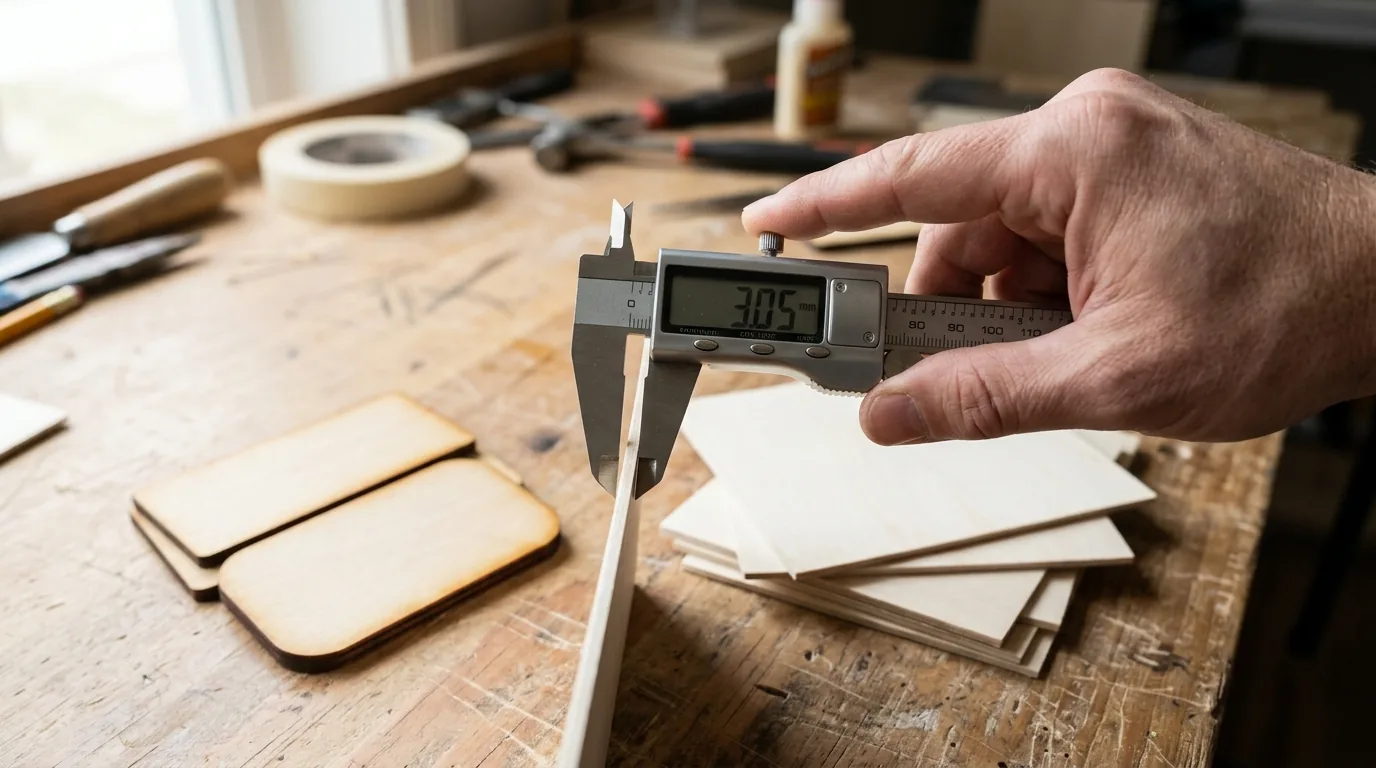
I proved this to myself the annoying way. I grabbed three sheets out of the same 12-pack, ran my digital calipers over each one, and got three different readings: 2.9mm, 3.0mm, and 3.1mm. All three sit comfortably inside the EN315 range. All three are technically correct. None of them are “wrong,” even though none of them match the label exactly.
That’s the mindset shift this whole guide is built around. Think of “3mm” as a nominal number, like a shirt labeled “medium” – close enough to plan around, but not a guarantee you can skip checking.
Once you’ve got real numbers off your own sheets, you can fine-tune your basswood laser cutting settings instead of trusting whatever the packaging says. And if you’re comparing suppliers before a bulk order, our roundup of best basswood sheets for laser cutting is a good place to start.
Once you know your own numbers, “3mm” stops being a mystery and starts being data you can actually design around.
How a 0.3mm Difference Wrecks Your Focus, Kerf, and Joint Fit
A 0.3mm gap between what your software thinks the sheet is and what it actually is throws off three things at once: focus distance, kerf width, and joint fit. None of those are small deals once you’re mid-cut.
Focus first. Your laser calculates standoff distance from the thickness value you type in. Off by a few tenths and you’re not focused where you think you are, so power at the surface drops and cuts that should go straight through start leaving a skin on the bottom. Kerf follows the same logic – your slot widths get planned around an assumed thickness, and if the real material runs thinner or thicker, that kerf math doesn’t line up anymore. Then there’s joint fit: tabs and slots cut for one thickness value will sit loose or jam tight the moment the actual sheet disagrees with the number in your software.
There’s a documented case from the LightBurn forums that sums this up well. A maker measured a sheet’s corner at 0.3mm below the center reading. The full-thickness setting cut clean in the middle but left a skin at the corner – only after dropping the material thickness setting to 2.7mm did the test square finally cut all the way through everywhere.
I’ve had my own version of this. Built a box joint where the tabs sat flush on one side of the panel and jammed solid on the other side of that same sheet. Same file, same settings, same sheet – just enough thickness variation across the panel to turn a clean fit into a fight. Once you’ve got a real caliper reading instead of the label value, run it back through the laser settings calculator to reset focus and kerf before you cut anything else.
The 6-Step Caliper Check I Run on Every New Batch
Run these six steps on any new batch before you trust it with a real project – it takes a few minutes and saves you a ruined sheet later.
- Grab a set of digital calipers. Nothing fancy needed, just something that reads to a tenth of a millimeter.
- Measure 3 to 5 points on the sheet, including all 4 corners and the center. One reading near the edge tells you nothing about the rest of the panel.
- Record the minimum and maximum reading, not just one spot. The spread matters as much as the average.
- Compare that range against the supplier’s stated spec sheet – not some universal number pulled from a forum post. Tolerance is a supplier-specific thing.
- Cut one small test slot or tab and dry-fit it against a known reference piece before you run the full project.
- Update the software’s material thickness setting to the measured real value, and log it with the batch and date so you’re not guessing next time.
I skipped step 5 once on a jewelry box and the finger joints stopped halfway through assembly because the sheet ran thicker than the label claimed. Now the test slot happens before anything else gets cut, full stop – cheap insurance against a sheet that’s lying to you by a few tenths.

Normal Tolerance or Red Flag? How to Tell the Difference
A reading between 2.6mm and 3.3mm is normal for nominal 3mm plywood under EN315 – that range is a documented reference point, not a hard ceiling on what counts as acceptable. Some maker-focused brands publish tighter specs than EN315’s general table, so check what your supplier actually promises before you write off a 2.9mm reading as a problem.
The real red flags look different: a sheet that falls outside the supplier’s own stated spec, or one sheet with a big spread between its thinnest and thickest spot – like the 0.3mm corner-to-center gap from the LightBurn example earlier. That’s a consistency problem, not a tolerance problem, and it’s the kind of thing that ruins a project even when every individual reading is technically “in range.”
Thickness inconsistency and void defects are separate quality issues worth checking on their own – see spotting bad batches for the void side of things. I’ve had a batch measure 3.1mm to 3.2mm across every sheet, consistent but slightly high, and it cut fine once I matched the software setting to it. A different batch swung from 2.7mm to 3.2mm on one single sheet – that one went back.
3 Mistakes Buyers Make When Their “3mm” Doesn’t Match
Most complaints about mismatched thickness trace back to one of three habits, not an actual bad batch.
- Panicking over any non-3.0mm reading: A 2.9mm or 3.1mm measurement can sit inside a normal published range like EN315’s 2.6mm-3.3mm – it’s not automatically a defect.
- Measuring one spot and calling it done: Checking a single point near the edge misses the corner-to-center variation that actually causes fit problems. Check all four corners and the center before you trust the number.
- Forgetting to update software settings: Switching batches or suppliers without updating thickness and kerf in your cut file is the most common reason parts that used to fit suddenly don’t.
Ask me how I know: I reused an old LightBurn file’s thickness setting on a new batch and got a box that flat-out wouldn’t close. Turned out the new batch measured a couple tenths thicker than the one that file was built for.
Why Crafteker’s 3mm Basswood Is Worth Verifying (And Keeping)
Crafteker’s 3mm basswood sheets are laser-grade, void-free, and cut 12×12 inch – worth checking with calipers, then worth sticking with once they hold steady sheet to sheet. That consistency is what you’re actually paying for, not the label on the pack.
Measure it yourself: run the 6-step caliper check on a fresh pack and see how tight the spread is before you commit a full project. I ran it on a Crafteker 12-pack and every sheet measured within a couple tenths of a millimeter of the others, corner to corner.
Sheets ship in a 3-pack ($12.99), 5-pack ($15.97), or 12-pack ($24.99, about $2.08 per sheet – the best per-sheet value of the three). For more on what separates a reliable batch from a risky one, see best basswood sheets.
Ready to cut? Get the wood that works with these settings:
→ Buy Crafteker 12-Pack Basswood Sheets on Amazon – $24.99
Also available: 5-pack ($15.97) · 3-pack ($12.99)
Frequently Asked Questions
Is it normal for ‘3mm’ plywood or basswood to not be exactly 3mm?
Yes – EN315’s tolerance table lists nominal 3mm plywood as roughly 2.6mm to 3.3mm, so a sheet landing off dead-center is a documented manufacturing reality, not automatically a scam. What counts as acceptable beyond that reference range still comes down to your specific supplier’s stated spec, so check that before you assume something’s wrong.
How do I check if my laser sheets are actually 3mm thick?
Grab digital calipers and measure 3 to 5 points, including all four corners and the center, then write down the minimum and maximum reading instead of trusting one spot near the edge. If those numbers worry you, cut a small test slot and dry-fit it before you commit the whole project.
Why does sheet thickness matter for laser cutting?
Because your actual thickness, not the label, drives focus distance, kerf math, and how tight your tabs and slots sit in a box joint. In one LightBurn forum case a sheet’s corner measured 0.3mm lower than its center, and the test cut only went all the way through once the software’s material thickness was set to 2.7mm. Re-run your numbers at the laser settings calculator once you’ve got a real measurement.
What thickness tolerance should I expect from laser-grade basswood?
There’s no single fixed number that applies everywhere – it depends on the supplier and product line. EN315 gives a general reference range of about 2.6mm to 3.3mm for nominal 3mm plywood, but the real answer is whatever your supplier publishes, checked against your own caliper readings.
Where can I buy consistent 3mm basswood sheets for laser cutting?
Crafteker sells 12×12 inch, laser-grade, void-free 3mm basswood on Amazon: a 3-pack ($12.99), a 5-pack ($15.97), and a 12-pack ($24.99, about $2.08 per sheet). Caliper a batch the day it arrives and you’ll have a real baseline to hold future orders to.
About the author: Mike Dolan is a laser maker and wood materials specialist with 8+ years cutting basswood, birch, and MDF on diode and CO₂ machines. He tests every Crafteker basswood batch before listing.
My box joint corners wouldn’t seat flush so I broke out the calipers and found the sheet ran thinner near the edges than in the middle – reset the thickness in LightBurn to match and the next cut fit right. Grabbed a Crafteker 12-pack after that and every sheet I’ve checked so far has measured basically the same corner to corner, which is honestly all I want from a 3mm sheet.