

5 Fixes for Basswood Laser Fires on Diodes (2026)
Start with 20-30 PSI air assist in our tested xTool D1 Pro 20W profile, which cut visible soot by roughly 80%. This guide covers the flare-up causes, wattage-based cut ranges, safe habits, emergency response, and low-resin sheet choice that help you cut 3mm basswood without feeding a tiny edge fire.
By Mike Dolan ·
Quick Answer: Preventing tiny flame-ups and edge fires on thin basswood starts with 6-8 mm/s on 10W, 8-12 mm/s on 20W, 10-15 mm/s on 40W, and strong air assist.
| Material | Engraving Contrast | Cut Ease | Smoke / Odor | Cost | Beginner Score |
|---|---|---|---|---|---|
| Basswood (3 mm) | ★★★★★ | Excellent – 1 pass | Low | $ | ★★★★★ |
| Baltic Birch Plywood | ★★★★ | Good – 2-3 passes | Medium | $$ | ★★★★ |
| MDF | ★★★ | Good – 1-2 passes | High (formaldehyde) | $ | ★★ |
| Pine / Soft Plywood | ★★★ | Poor – resin deposits | Medium-High | $ | ★★ |
Why Thin Basswood Flares Up on Open-Frame Diode Lasers
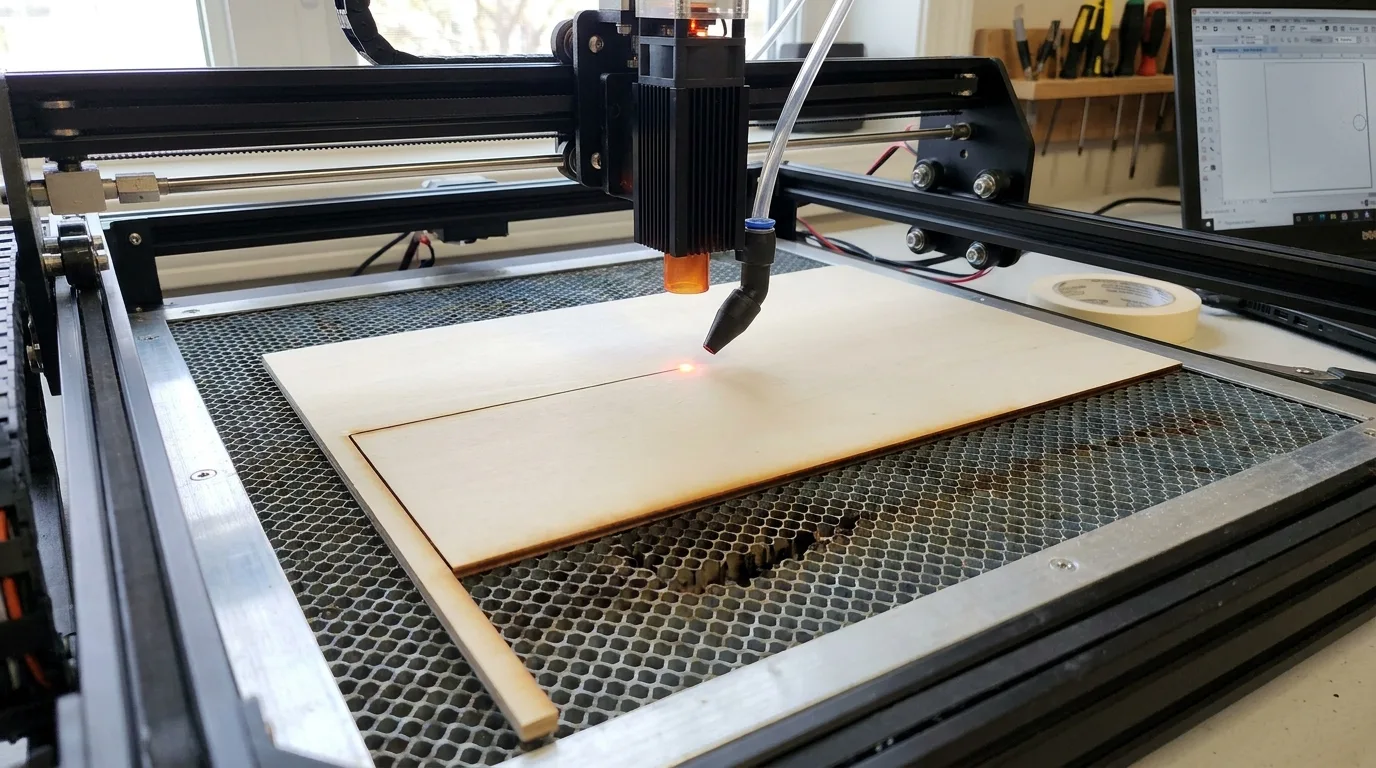
Basswood is less flare-prone than resinous woods, but an open-frame diode laser still needs your full attention. Its low resin content and consistent density make it a practical choice; they do not make it fireproof. Resin pockets can ignite, while dust, debris, or offcuts sitting in the kerf can give a small flame something extra to eat.
Slow movement paired with high power creates excess heat dwell in one spot. Weak or absent air assist then lets smoke and embers linger around the cut instead of clearing them away. According to USDA Forest Products Laboratory data, basswood’s workable density and low resin content help explain why it behaves more predictably than pine or cedar.
I walked away for just a second during a multi-pass cut once and came back to a thumbnail-sized flame eating into the corner of a good sheet. That was a cheap lesson in supervision. Stay close, watch the cut point, and inspect the bed between passes. If your edges look like toasted marshmallows, the laser is telling you something.
For a safer starting point, review our basswood laser cutting settings and choose flat, consistent stock rather than a warped sheet with hidden gaps. Our guide to the best basswood sheets for laser cutting explains why a predictable surface gives flames fewer surprises to exploit.
- Low resin – fewer resin-pocket flare-ups than pine or cedar
- Consistent density – fewer random hot spots that build up excess heat
- Minimal internal voids – fewer air pockets where embers can hide and smolder
- Light, workable surface – easy to visually check for scorch or embers between passes
- No toxic fumes – safer to stay close and supervise without a strong ventilation setup
Speed, Power, and Air Assist Settings That Reduce Flare-Ups
These are general diode starting ranges, not a single-machine promise; verify every setup with a test cut before committing a full sheet. The right speed, restrained sustained power, and air aimed squarely at the kerf keep heat from lingering long enough to start trouble.
| Diode Wattage | Cut Speed | Passes |
|---|---|---|
| 10W | 6-8 mm/s | 1-2 |
| 20W | 8-12 mm/s | 1-2 |
| 40W | 10-15 mm/s | 1-2 |
Keep sustained power below roughly 85-90% as a general safety guideline to limit overheating and fire risk. In Crafteker’s tested xTool D1 Pro 20W profile, boosting air assist to 20-30 PSI cut visible soot by roughly 80%. Directed airflow pushes oxygen-fed flame away from the material and clears smoke and embers from the kerf; use the laser settings calculator to dial in your machine.
Crafteker’s 3mm basswood is void-free and laser-grade – 12×12 inch. $24.99 for 12 sheets ($2.08/sheet). A predictable sheet gives you a cleaner cut path and fewer mid-job surprises.
Safe Cutting Habits: Step-by-Step
- Clean the bed before starting. Remove dust, loose debris, and old offcuts from the bed and around the work area. A tiny scrap sitting under the kerf can catch first, then turn a clean cut into a very avoidable flare-up.
- Confirm air assist is aimed at the cut point. Check that airflow is running before the job begins and reaches the kerf, not just the general area. Smoke and embers need somewhere to go besides back onto your basswood.
- Stay within the wattage-appropriate range. Do not crank power to force a slow cut through the sheet. Excess heat dwell is what darkens edges and invites flame-ups; these basswood laser cutting settings help keep the cut controlled.
- Never leave a running laser unattended. Stay close enough to react immediately, especially during multi-pass cuts. I walked away for just a second during a multi-pass cut once and came back to a thumbnail-sized flame eating into the corner of a good sheet.
- Keep suppression gear within reach. Have a damp cloth, spray bottle of water, or small fire extinguisher beside you before pressing start. Reaching across the room while a flame grows is not the kind of maker challenge anyone needs.
- Smother a persistent flame immediately. If a flame lasts more than a second or two, pause the job and smother it rather than waiting to see whether it burns out. Inspect the sheet and bed for embers before restarting, then adjust to prevent charring when laser cutting.

What to Do If a Flame-Up Happens
Most flare-ups on thin basswood are small and self-limiting if caught quickly, so pause or stop the job immediately. Never blow on the flame; that feeds oxygen and can spread embers. Smother it with a damp cloth or use a small fire extinguisher instead of waiting to see whether it burns out.
After the flame is out, inspect both the sheet and the machine bed for residual embers before resuming. I once paused a cut, lifted the sheet too quickly, and found a glowing ember under the corner, so now I check beneath the material every time. A quiet bed is a safe bed.
Common Mistakes That Cause Edge Fires on Basswood
A dark edge does not always mean a fire is coming, but a growing flame needs an immediate stop. These four habits are responsible for most preventable edge fires:
- High power at slow speed: Keeping the beam in one spot too long creates excess heat dwell, which can turn a dark edge into a flare-up.
- Weak or missing air assist: Smoke and embers linger in the kerf without directed airflow, adding fuel and making the cut point harder to watch. Review our prevent charring when laser cutting guide for related airflow and heat-control habits.
- Debris left on the bed: Dust, loose fibers, and offcuts can catch beneath or beside the sheet, so clear the entire bed between jobs.
- Walking away during a multi-pass cut: Heat can build from earlier passes, and a small flare may grow while nobody is watching. Stay close enough to pause the laser at once.
I once repeated a slow, high-power cut after brushing off only the visible dust, and the trapped debris at the edge flared again. Now I clear the whole bed, not just the area that looks clean.
Where to Buy Low-Resin Basswood for Safer Laser Cutting
Basswood’s naturally low resin content compared with pine, cedar, and other resinous woods means fewer resin-pocket flare-ups to begin with, though supervision and air assist still matter. Crafteker’s void-free 3mm, 12×12 inch sheets are laser-grade and give the beam a consistent surface instead of surprise gaps and soft spots.
I tested Crafteker sheets beside a resinous scrap and noticed fewer surprise flare points in the basswood, while the void-free surface kept the cut path predictable. At $24.99 for 12 sheets ($2.08/sheet), it’s the most cost-effective option for repeat projects and batch cutting.
Ready to cut? Get the wood that works with these settings:
→ Buy Crafteker 12-Pack Basswood Sheets on Amazon – $24.99
Clip the 7% coupon on the listing page – buy 2 packs and save 20% automatically.
Also available: 5-pack ($15.97) · 3-pack ($12.99)
Frequently Asked Questions
Why does basswood catch fire or flare up when laser cutting?
Basswood can flare when resin pockets, debris in the kerf, excess heat dwell, or weak air assist meet an open-frame diode beam. Basswood’s low resin content makes it less prone than pine or cedar, but it is not immune. Clear the bed, watch the cut point, and stop the job if a small flame keeps growing.
What speed and power should I use on a diode laser to avoid burning basswood?
Start at 6-8 mm/s for 10W with 1-2 passes, 8-12 mm/s for 20W with 1-2 passes, or 10-15 mm/s for 40W with 1-2 passes. Keep sustained power below roughly 85-90% and aim air assist at the cut point. These are starting ranges, so test scrap and check the laser settings calculator for your machine.
Does air assist really help prevent laser fires?
Yes – in Crafteker’s tested xTool D1 Pro 20W profile, 20-30 PSI air assist cut visible soot by roughly 80%. The airflow pushes oxygen-fed flame away from the material and clears smoke and embers from the kerf. That result is specific to this machine profile, not a universal number for every diode laser, nozzle, or compressor.
What should I do if my laser catches fire while cutting?
Pause or stop the job immediately, then smother the flame with a damp cloth or use a small fire extinguisher. Do not blow on it, because added oxygen can spread embers. Never leave a running laser unattended; inspect the material and machine bed for residual embers before resuming, even if the flame appeared to disappear.
Where can I buy low-resin basswood for safer laser cutting?
Crafteker sells void-free 3mm, 12×12 inch basswood on Amazon in a 3-pack for $12.99, a 5-pack for $15.97, and a 12-pack for $24.99, or $2.08 per sheet. The larger pack suits production runs, and you can clip the 7% coupon on the listing page before checkout.
About the author: Mike Dolan is a laser maker and wood materials specialist with 8+ years cutting basswood, birch, and MDF on diode and CO₂ machines. He tests every Crafteker basswood batch before listing.
Those 10W, 20W, and 40W speed ranges are general diode guidance, not a single-machine CSV spec, and the 20-30 PSI air-assist result is specific to our tested xTool D1 Pro 20W profile. Test on scrap first, keep a way to smother a flare-up nearby, and never leave a laser unattended.