

Real vs Advertised Laser Wattage: 2026 GRBL Power Fix
Your “40W” laser probably isn’t putting out 40W at the beam, and even if it were, a mismatched GRBL $30 value and LightBurn S-Value Max setting can silently cap whatever power you actually have. Below is a way to test your own machine’s real output on 3mm basswood, no power meter required.
By Mike Dolan ·
Quick Answer: Real wattage vs advertised wattage diode laser confusion comes from two stacking problems: inflated marketing numbers that mistake input power for optical output, and GRBL $30/S-Value Max mismatches that cap power before it reaches the diode.
| Material | Engraving Contrast | Cut Ease | Smoke / Odor | Cost | Beginner Score |
|---|---|---|---|---|---|
| Basswood (3 mm) | ★★★★★ | Excellent – 1 pass | Low | $ | ★★★★★ |
| Baltic Birch Plywood | ★★★★ | Good – 2-3 passes | Medium | $$ | ★★★★ |
| MDF | ★★★ | Good – 1-2 passes | High (formaldehyde) | $ | ★★ |
| Pine / Soft Plywood | ★★★ | Poor – resin deposits | Medium-High | $ | ★★ |
Why Your “40W” Diode Laser Isn’t Actually 40W
Because that sticker almost always describes electrical input power, not the optical power actually leaving the lens. Cheap diode listings borrow the wattage rating from the power supply or the diode’s rated draw rather than from anything measured at the beam.
Documented measurements on these modules show real optical output can land far below the printed number. I want to be careful here, though: the exact gap varies widely by brand, driver board, and how hard the diode is pushed. There’s no fixed formula you can apply across machines, so treat any single number you see online as one data point, not gospel.
I learned this the annoying way. I set up a fresh 3mm basswood scrap expecting my “40W” module to slice through in one pass at a speed I’d copied off a forum thread. It left a shallow brown scratch that wiped off with a fingernail.
This is where basswood earns its keep as a diagnostic tool rather than just a hobby material. According to USDA Forest Products Laboratory data, basswood sits among the more uniform, low-resin domestic hardwoods, and that consistency is exactly why it removes material variability as a confound when you’re trying to isolate a power problem.
Once you’ve got a real read on your output, dialing in basswood laser cutting settings stops being guesswork. And if your test cells come out sooty instead of clean, it’s worth checking prevent charring when laser cutting before you blame the diode again.
- Input power – what the power supply draws from the wall, usually the number printed on the sticker
- Optical output – what actually leaves the lens and hits your material, often far below input power
- Brand variability – the gap between the two isn’t consistent across brands or diode drivers
- Basswood’s role – consistent, void-free density means a failed cut points to the laser, not the wood
GRBL’s $30 Setting and LightBurn’s S-Value Max: The Hidden Power Cap
GRBL’s $30 setting defines the maximum S-value the firmware uses for PWM power control, and it can quietly throttle your laser no matter how strong the diode actually is. Power scales linearly between S0 and S$30, so whatever number sits in $30 is the real ceiling your machine will ever fire at.
Here’s the illustrative math: if LightBurn’s S-Value Max is set to 1000 but your firmware’s $30 is actually 255, telling the software to fire at 100% power sends S255. GRBL checks that against its own $30 ceiling of 255, which lands at 25% of the 0-1000 scale LightBurn shows you. That 25% is just this one example’s math, not a ratio to expect on your own machine.
This is a separate problem from the wattage marketing issue, and the two stack. A machine can have a genuinely weak diode and a software cap layered on top of it, so fixing one without checking the other still leaves you underpowered.
Ask me how I know. I spent two weeks blaming the diode and re-leveling my bed before I finally opened the GRBL settings and found $30 sitting at 255 while LightBurn’s S-Value Max was still the factory default of 1000. Matching the two numbers is free. Blaming the hardware first cost me two weeks.
Build a Test-Cut Grid on 3mm Basswood to Find Your Machine’s Real Power
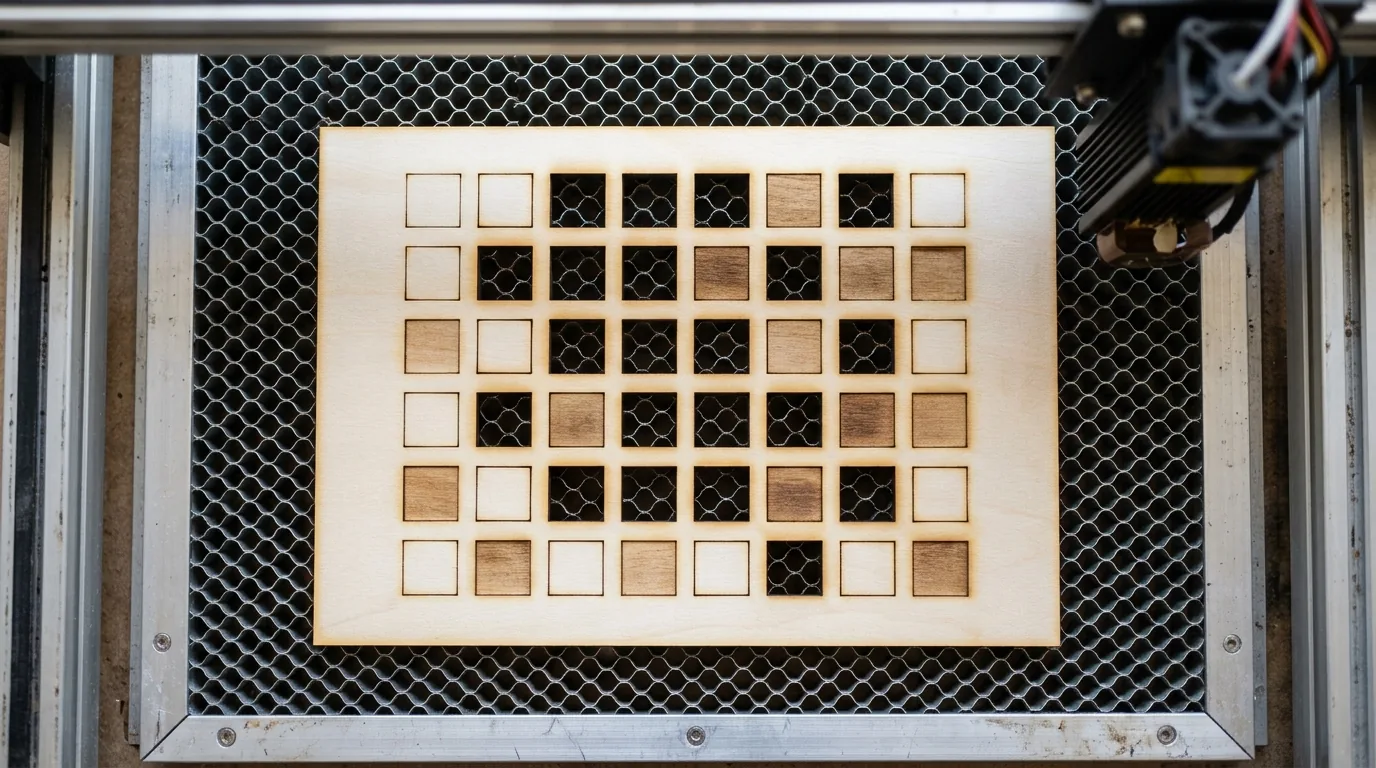
A test-cut grid on 3mm basswood shows you what your machine can actually cut through right now, not what the sticker or a forum post claims. Void-free basswood keeps the wood itself out of the equation, so a weak or strong cell in the grid is on the laser, not the material. Start with the laser settings calculator for a speed and power range.
- Lock focus height and turn on air assist. Leave both fixed for the whole test – any change mid-grid ruins the comparison.
- Lay out a grid. Speed steps down one axis, power percentage steps across the other, so every cell is a unique combination.
- Run the whole grid in one job. Same sheet, same session, same lighting keeps material and focus constant across every cell.
- Flip the sheet and inspect the underside. Note which cells cut clean through versus which only scorched or engraved the surface.
- Mark the boundary line. Where through-cuts start is your machine’s real power fingerprint at that focus, not the wattage sticker.
- Check $30 against S-Value Max, then re-run the grid. If they didn’t match before, previously “dead” cells may suddenly cut clean through.
Keep this grid on file. Rerun it any time you swap a lens, replace the diode, or flash new firmware – it’s faster than staring at a scorched sheet trying to remember how to prevent charring when laser cutting.
My first grid came out a checkerboard of soot and scorch marks. Out of the whole sheet, only two cells actually fell through when I flipped it over – and that boundary told me more about my machine than any spec sheet did.

Why Copying Someone Else’s Basswood Settings Off a Forum Doesn’t Work
Because the wattage sticker tells you almost nothing about what your specific machine does at the beam. Two lasers with identical wattage labels can behave completely differently, depending on how much of the real optical output gap and the $30/S-Value Max mismatch each one is carrying, and in what proportion.
I copied a forum poster’s exact speed and power for 3mm basswood because our listings both said the same wattage. His cut clean through. Mine left a brown scorch line and nothing else. Same numbers, different machines, different results.
Treat any settings you find online as a starting point for your own test grid, not a guarantee of a through-cut. If you’re still stuck after matching $30 to S-Value Max and re-running the grid, the wood or settings diagnostic checklist covers the other usual suspects.
Three Mistakes People Make Chasing the Wattage Mystery
The biggest mistake is treating a power problem like a settings problem instead of a firmware problem. Here’s where most people lose sheets and time:
- Stacking extra passes on a capped machine: more passes just char the edges and widen the kerf – it doesn’t fix a $30/S-Value Max mismatch underneath.
- Trusting the sticker over a test cut: the wattage label tells you what the machine was marketed as, not what it can actually cut through today.
- Changing $30 or S-Value Max alone: update one without confirming the other matches and you’ve just moved the cap, not removed it.
Ask me how I know. I ran a fourth pass over the same line, fully convinced stacking passes would eventually push it through. All it did was leave a wider, uglier char mark in the exact same spot.
Crafteker Basswood: A Reliable Baseline for Testing Your Laser’s Real Power
Crafteker’s void-free 3mm basswood works as a baseline because consistent density removes material variability from the equation, so a dead cell in your grid is actually a power problem, not a knot. It’s 12×12 inch, laser-grade, and sanded to a uniform thickness sheet to sheet.
I burned through two hobby-store sheets with visible knots before switching over, and some of my “results” turned out to be wood, not wattage. Sheets run 3-pack ($12.99), 5-pack ($15.97), or 12-pack ($24.99) – the 12-pack works out to $2.08/sheet, the better deal when you’re running a full grid more than once.
Once you’ve found your real power baseline, plug those numbers into the laser settings calculator – it’ll get you closer to workable settings than any forum thread will.
Ready to cut? Get the wood that works with these settings:
→ Buy Crafteker 12-Pack Basswood Sheets on Amazon – $24.99
Also available: 5-pack ($15.97) · 3-pack ($12.99)
Frequently Asked Questions
Why is my 40W laser not cutting 3mm basswood like the settings I found online?
Two things are usually stacked: your ’40W’ sticker likely means input power, not optical output at the beam, and your GRBL $30 value may not match your software’s S-Value Max, which caps power before it reaches the diode. Run a test-cut grid on 3mm basswood at fixed focus and air assist to find where your machine actually cuts through instead of trusting the label.
What is the GRBL $30 setting and why does it matter for laser power?
GRBL’s $30 sets the max S-value used for PWM power control, and power scales linearly between S0 and S$30 – mismatches with your software’s S-Value Max cap real output before it ever reaches the diode. If S-Value Max is 1000 but $30 is 255, telling the machine to fire at 100% sends S255, which GRBL reads as only 25% of its own range, not full power.
How can I test my laser’s real power without a power meter?
Cut a grid on 3mm basswood with fixed focus height and air assist left on, stepping speed down one axis and power percentage across the other, all in a single job so lighting and material stay constant. Flip the sheet over and note which cells cut through versus which only scorched; that boundary is your machine’s real power fingerprint.
Is advertised diode laser wattage accurate?
Often not. Many cheap diode modules label the sticker with electrical input power straight off the power supply, or an inflated marketing number, rather than true optical output measured at the beam. Documented tests show real output can land far below the sticker number, but the gap varies widely by brand, so there’s no fixed ratio you can apply across every machine.
Where can I buy consistent basswood sheets for testing my laser settings?
Crafteker sells void-free 3mm 12×12 inch laser-grade basswood for exactly this kind of testing: a 3-pack for $12.99, a 5-pack for $15.97, and a 12-pack for $24.99, which works out to $2.08 per sheet on Amazon. Consistent, void-free density matters since it removes material variability while you isolate a power problem on your own machine.
About the author: Mike Dolan is a laser maker and wood materials specialist with 8+ years cutting basswood, birch, and MDF on diode and CO₂ machines. He tests every Crafteker basswood batch before listing.
Copied a friend’s exact 3mm basswood speed and power from a forum thread and mine just wouldn’t cut through, burned two sheets before I actually went and checked my $30 value against LightBurn’s S-Value Max and they didn’t match at all. Fixed the mismatch and finally got clean through-cuts using basically the same settings range he was using.